• Contact
  • Homelab
Dimitris Tonias
  • Management
  • Monitoring
  • Cloud
  • Virtualization
  • Networking
  • Productivity
No Result
View All Result
  • Management
  • Monitoring
  • Cloud
  • Virtualization
  • Networking
  • Productivity
No Result
View All Result
Dimitris Tonias
No Result
View All Result

Enable or disable Direct Messages from anyone on Twitter

Dimitris Tonias by Dimitris Tonias
August 19, 2017 - Updated on April 21, 2024
in Productivity
Reading Time: 1 min read
A A
0
Share on FacebookShare on Twitter

By default, you can only send a direct message only to Twitter users you follow. This is logical since you can prevent messages from strangers.

However, Twitter broadened the scope of direct messaging by allowing users to interact via direct messages even if you don’t follow them. A good example for such cases is when you manage the Twitter account of a store, brand, page, etc., expanding the communication channel even further.

Turning on or off direct messages from anyone on Twitter is very easy, as you will see below.

Enable or disable direct messages from anyone on Twitter

From the Twitter homepage, click on your account image and then on the Settings and Privacy menu.

Enable or disable Direct Messages from anyone on Twitter

Next, go to the Privacy and Safety category.

Enable or disable Direct Messages from anyone on Twitter

Here, in the Direct messages section, enable or disable the Receive Direct Messages from anyone option.
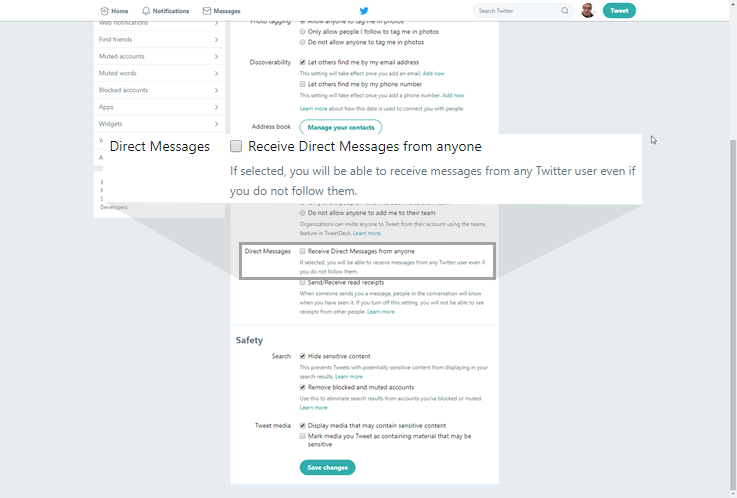
Enable or disable Direct Messages from anyone on Twitter

Finally, click the Save changes button. For security reasons, you will be asked to enter your Twitter account password.

That’s it! The process is similar whether you use the web version of Twitter or the corresponding application for iOS or Android devices.


Tags: Twitter
ShareTweetPin
Previous Post

Blurry font on a remote desktop connection

Next Post

Move sidebars to the right in Firefox

Related Posts

Identity Hub
Productivity

The code came fast. Trust took months.

Check word count on Google Docs
Productivity

Check word count on Google Docs

Visio 2016, can't open files and stencils from older versions
Productivity

Visio 2016, can’t open files and stencils from older versions

Xiaomi Temperature Humidity Sensor Review
Productivity

Xiaomi Temperature Humidity Sensor Review

Speed up a slow opening Downloads folder
Productivity

Speed up a slow opening Downloads folder

Change network connection priority on Windows 10
Productivity

Change network connection priority on Windows 10

Leave a Reply Cancel reply

Your email address will not be published. Required fields are marked *

No Result
View All Result
Identity Hub
Productivity

The code came fast. Trust took months.

How a small experiment with Claude Code grew into an identity operations platform and changed the way I think about...

Read moreDetails
Zabbix server: More than 75% used in the trends cache

Zabbix server: More than 75% used in the trends cache

Check word count on Google Docs

Check word count on Google Docs

Zabbix server: More than 75% used in the configuration cache

Zabbix server: More than 75% used in the configuration cache

Approve updates in WSUS 2016

Approve updates in WSUS 2016

Configure Group Policy to deploy updates using WSUS 2016

Configure Group Policy to deploy updates using WSUS 2016

Configure computer groups in WSUS 2016

Configure computer groups in WSUS 2016

  • Contact
  • Homelab

© 2024 Dimitris Tonias

No Result
View All Result
  • About
  • Contact
  • Free Tools
  • Home
  • Homelab

© 2024 Dimitris Tonias

This website uses cookies. By continuing to use this website you are giving consent to cookies being used.